
In partnership with

 LUXE PROMPTING
LUXE MODEL FIRST LOOK
FLUX 3 Image Klein: 3 Layout Prompts for BFL's New Open Model
Black Forest Labs released FLUX 3 Image Klein on October 15: a 5.6-billion-parameter open-weights model that brings FLUX 3's bounding-box layout control to hardware you may already own. With BFL's INT8 build, it runs on NVIDIA GeForce RTX GPUs with as little as 8GB of VRAM, through ComfyUI or Diffusers.
It keeps native 4K output and up to 10 reference images, and on the BFL API pricing starts at $0.009 per 1K image. Here are three copy-paste layouts to learn its box format.
100+ ChatGPT Prompts to Revolutionize Your Day

Supercharge your productivity with HubSpot's comprehensive guide to Chat GPT. This free resource is your fast track to AI mastery:
Industry-Specific Use Cases: 15+ real-world applications across various sectors
Productivity Guide: 21 best practices to 10x your efficiency with AI
Prompt Powerhouse: 100+ ready-to-use prompts for immediate implementation
Challenge Buster: Overcome common AI hurdles with expert strategies
Plus, in-depth sections on email composition, content creation, customer support, and data analysis.
The Short Version
- Klein reads each position as [top, left, bottom, right] on a 0 to 1000 grid, written into the prompt itself.
- Three layouts to copy: a poster with two text lines, a product flat lay and a three-panel comic.
- Choose the aspect ratio first, because the box numbers are relative to it.
How to use these prompts
Run Klein locally with the weights from Hugging Face in ComfyUI or Diffusers, or call it as flux-3-image-klein on the BFL API or in BFL's Playground. It uses the same request and box format as the full FLUX 3 Image, so these prompts work on both. The weights are under the FLUX Kommunity License, which allows free commercial use for individuals and companies with under $5M in annual revenue.
Paste the whole prompt, description and box list together, into the prompt field, and set the aspect ratio listed with each prompt. Each element gets an id that also appears in the description inside angle brackets, a bbox with its position and a desc with its appearance. BFL's documentation calls box placement "a strong hint, not a hard constraint," so check the result and nudge numbers if something lands off.
Running Klein on your own machine? On October 17, BFL updated its ComfyUI workflows and its Hugging Face Space after some launch-day results came out weak. For the best results, BFL now recommends ComfyUI v0.41.3 with its updated workflow, prompt upsampling switched on and 2K resolution. If you downloaded the launch-day workflow, grab the new one before trying these prompts.
Our example images were not made with Klein. We generated them with beehiiv's built-in, Gemini-based image tool to show the layout each box list describes.
Also new: OpenMOSS released MOSS-Image on October 16, an Apache-2.0 open model that also takes JSON layout prompts. Its boxes use pixels measured from the canvas center, so these prompts won't paste across unchanged.
1. A poster with every line in place
Text placement is where boxes pay off fastest. Give each line of text its own row with the exact words in quotes, plus case, color and type style.
The exact prompt
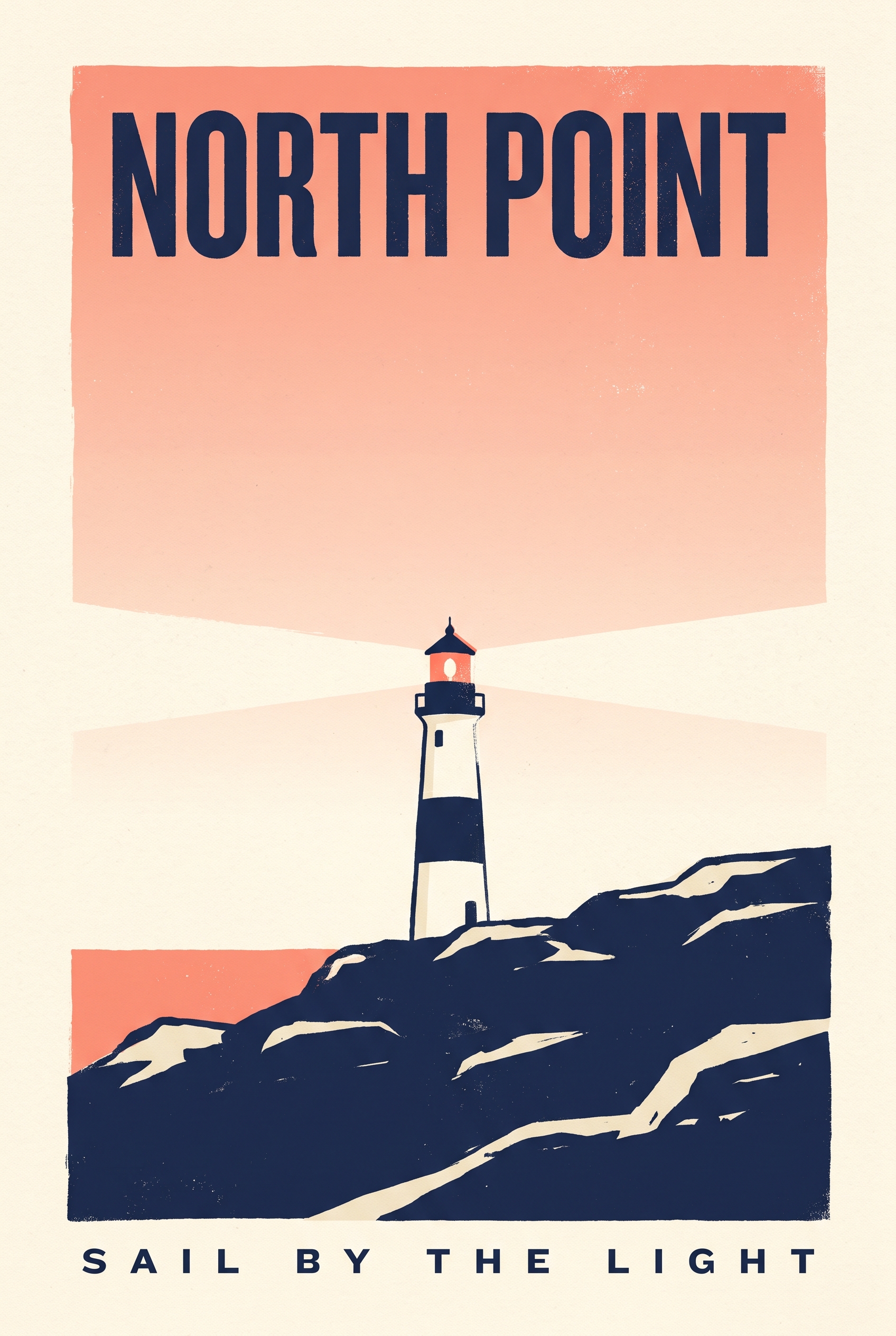
Illustrative example, not made with FLUX 3 Image Klein: generated for this issue with beehiiv's Gemini-based image tool from the scene description in the prompt below, to show the layout the boxes describe. Your Klein result will differ.
Aspect ratio 2:3. A minimalist travel poster on textured cream paper, flat screen-print style in three inks: navy, coral and cream. The title
Why it works: Each text line has its own row with the exact words quoted, so the model is told both what to write and where to put it.
Try it: BFL API and Playground · FLUX 3 Image Klein weights on Hugging Face
What the result shows
In our illustrative version, both text lines are spelled correctly and sit top and bottom, with the lighthouse on the rocks below center. It drifted slightly right of center, though, which is exactly the kind of placement the lighthouse_1 box is there to pin in Klein. Compare your result against the box before you change any wording.
One variation to try
Change only the two quoted strings and the lighthouse row to make a poster for your own town. Leave the other boxes alone.
2. A product flat lay, arranged for you
Flat lays live or die on spacing. Boxes let you set the arrangement once and reuse it, swapping in a different product each time.
The exact prompt

Illustrative example, not made with FLUX 3 Image Klein: generated for this issue with beehiiv's Gemini-based image tool from the scene description in the prompt below, to show the layout the boxes describe. Your Klein result will differ.
Aspect ratio 4:3. A top-down flat-lay product photograph on a pale oak table, soft diffused daylight from the left, gentle shadows and plenty of empty space. A white coffee cup
Why it works: Words ("upper left") and coordinates say the same thing twice, which is what BFL's layout guide recommends.
Try it: BFL API and Playground · FLUX 3 Image Klein weights on Hugging Face
What the result shows
Each object landed in its own quadrant with clean space between them, which is the arrangement this box list describes. For your own product shots, the useful move is to keep every box and rewrite just one desc.
One variation to try
Klein accepts up to ten reference images. Add a photo of your own product and change notebook_1's desc to describe it, keeping the same box.
3. A three-panel comic with no bleeding panels
BFL lists the panels of a grid as one of the things boxes are for. One row per panel keeps each scene inside its frame, and the speech bubble gets its own box too.
The exact prompt
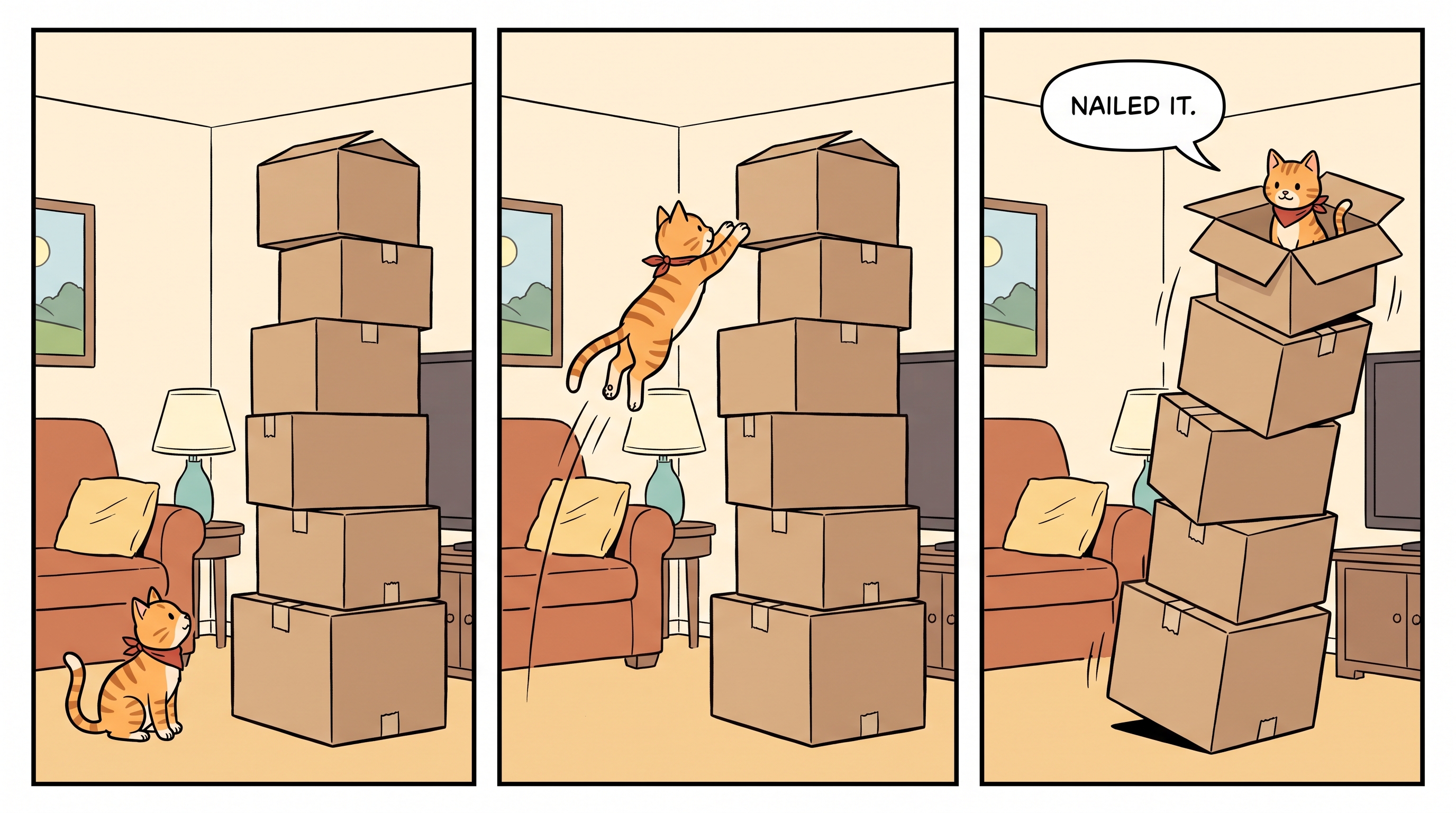
Illustrative example, not made with FLUX 3 Image Klein: generated for this issue with beehiiv's Gemini-based image tool from the scene description in the prompt below, to show the layout the boxes describe. Your Klein result will differ.
Aspect ratio 16:9. A three-panel horizontal comic strip in clean ink-and-flat-color style, with thin black panel borders and white gutters. The same small orange tabby cat wearing a tiny red scarf appears in every panel. In the left panel
Why it works: Every panel and the speech bubble get their own box, so nothing has to guess where one scene ends and the next begins.
Try it: BFL API and Playground · FLUX 3 Image Klein weights on Hugging Face
What the result shows
Three equal panels, the same cat and scarf in each, and the bubble at the top of the right panel, spelled correctly. One continuity slip: the stack has six boxes in panel 1 but only five in panel 3. Repeating the key details in each panel's desc, such as "a stack of six boxes," is the fix to try.
One variation to try
Make it four panels in a 2x2 grid on a 1:1 frame: split the grid into quarters, for example [0,0,500,500] for the top-left panel, and add one more beat to the joke.
A quick check before you run it
- Boxes are [top, left, bottom, right], not x and y. Swapping the order is the most common mistake.
- Set the aspect ratio before you measure. On a 2:3 frame, a square needs a box 150 units wide for every 100 units tall.
- Check that every
in the description has a matching row in the list, and that every row is used. - Read printed text letter by letter, and label realistic AI images where the platform asks you to.
Make one of these yours
Pick one layout and change only the desc text first. Once that works, move one box and see what happens.
When you share it in the community, include the result, the full prompt with its box list, and whether you ran Klein locally (with your GPU) or on the API.
Source Desk
All three prompts are original Luxe editorial work written for this October 2026 issue. Model facts come from Black Forest Labs' FLUX 3 Image Klein announcement and release notes (October 15, 2026) and its FLUX 3 layout documentation; the MOSS-Image note comes from the OpenMOSS project page (October 16, 2026). Example images are illustrative and were not generated with Klein. Result notes describe these particular images.
FLUX 3 Image Klein announcement (BFL) · BFL release notes · Layout prompts guide · MOSS-Image (OpenMOSS) · FLUX 3 Image Klein weights on Hugging Face
A clearer brief. A more useful result.