In partnership with

 LUXE PROMPTING
LUXE FEATURE FIRST LOOK
Gemini Avatars Go Social: 3 Prompts to Star in Images With Your Friends
Gemini's personal avatars just became a group project. On October 29, Google announced that you can share your Gemini avatar with friends, tag each other in prompts, and appear together in the same images and videos.
A group photo no longer needs everyone in one room. Here are three prompts built for two or three people.
100+ ChatGPT Prompts to Revolutionize Your Day

Supercharge your productivity with HubSpot's comprehensive guide to Chat GPT. This free resource is your fast track to AI mastery:
Industry-Specific Use Cases: 15+ real-world applications across various sectors
Productivity Guide: 21 best practices to 10x your efficiency with AI
Prompt Powerhouse: 100+ ready-to-use prompts for immediate implementation
Challenge Buster: Overcome common AI hurdles with expert strategies
Plus, in-depth sections on email composition, content creation, customer support, and data analysis.
The Short Version
- Create your avatar once by recording your face and voice with your phone. Then share it with a friend by Gmail address; they accept, and you can each tag the other in prompts.
- Images come from Nano Banana, videos from Gemini Omni. Google says video with an avatar needs a Google AI plan.
- Three prompts to copy: a Friendsgiving table photo, a 1970s album cover for two, and a collectible action-figure two-pack.
What changed on October 29
Gemini has had personal avatars since Google introduced Gemini Omni earlier this year, but they were yours alone. The new part is sharing: you can send your avatar to friends, family or collaborators, tag each other with @ in prompts, and Google says Gemini keeps each person's look and voice consistent across images and videos.
You stay in control. People you share with have to accept, you can add or remove an expiration date for each person, and you can remove anyone's access at any time. Removing access stops new images and videos, but it doesn't delete anything they already made with your likeness, so only share with people you trust.
Who can use it: according to Google's help page, you need to be 18 or older and signed in with a personal Google account. Avatars currently work in English only and aren't available in the EEA, Switzerland or the UK.
Our example images were not made with Gemini avatars. We made them with beehiiv's built-in, Gemini-based image tool, describing made-up people instead of using anyone's face, so you can see the look each prompt is going for.
Set it up in two minutes
- On a computer, open gemini.google.com, click Add files in the text box, then More uploads, then Avatar. Scan the QR code with your phone and follow the steps to record your face and voice.
- Record at eye level, in even light and a quiet room, with no sunglasses, hat or mask.
- To share, go to Settings, then Avatar, then Share, and enter your friend's Gmail address. Ask them to do the same for you.
- In a prompt, type @ and pick a name from the menu. In the prompts below, replace @[you] and @[friend] with those tags.
1. The Friendsgiving table photo
November is group-photo season, and this is the picture that's hard to get when half the group lives in another city. Tag two or three friends and set the table.
The exact prompt

Illustrative example, not made with Gemini avatars: generated for this issue with beehiiv's Gemini-based image tool from a text description of made-up people, with no real faces or avatars. Your Gemini result will show you and your friends.
Needs: your avatar plus 1 or 2 avatars shared with you
Create a warm, candid photo of @[you] and @[friend 1] and @[friend 2] at a cozy Friendsgiving dinner table. Candlelight, string lights in the background, small pumpkins and autumn leaves on the table, and a hand-lettered place card that reads "FRIENDSGIVING". Everyone is mid-laugh, one person raising a glass. Shot on a 35mm lens at eye level, shallow depth of field, natural skin texture, warm golden tones. Keep each person's face and hairstyle true to their avatar.
Why it works: It describes the moment (mid-laugh, a raised glass) instead of a posed lineup, which makes group shots look natural. The last line tells Gemini to keep each tagged person true to their avatar.
Try it: Gemini app · Google help: create and share an avatar
What to check in your result
Check that every person looks like themselves and that nobody got merged into someone else. Read the place card letter by letter. If a face drifts, run it again with that person's tag first in the prompt.
One variation to try
Swap the table for a holiday ski cabin, a karaoke night or a game-day couch, and keep the last sentence word for word.
2. Your duo as a 1970s album cover
Album covers are a fun test of what Google says avatars are good at: keeping faces consistent while everything else, from clothes to era, changes completely.
The exact prompt
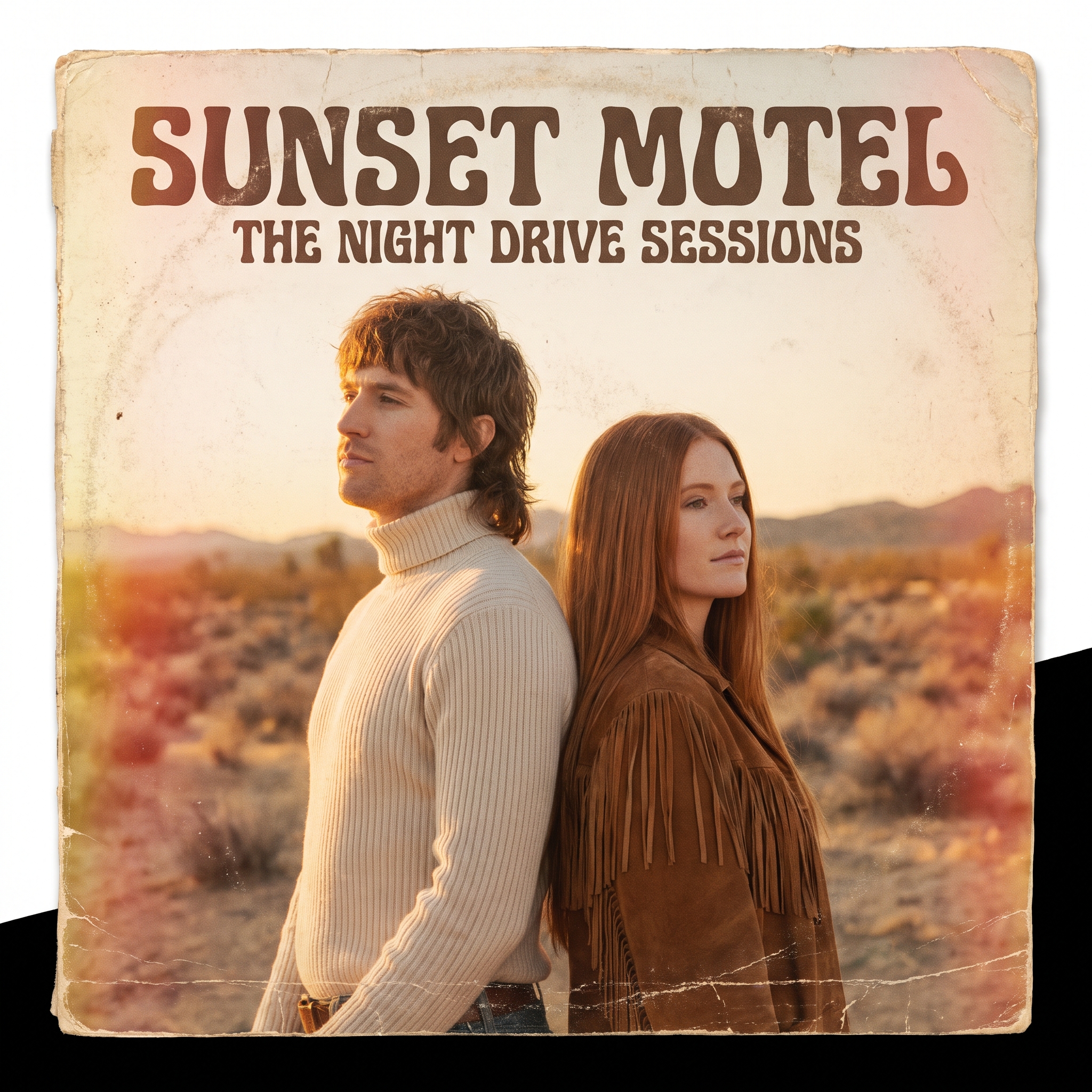
Illustrative example, not made with Gemini avatars: generated for this issue with beehiiv's Gemini-based image tool from a text description of made-up people, with no real faces or avatars. Your Gemini result will show you and your friends. Ours uses the band name SUNSET MOTEL and the album title THE NIGHT DRIVE SESSIONS.
Needs: your avatar plus 1 avatar shared with you
Make a square 1970s soft-rock vinyl album cover starring @[you] and @[friend], standing back to back in a desert at golden hour, dressed in 1970s clothes. Faded Kodachrome film colors, light leaks, film grain and a worn cardboard texture with a ring-wear circle. Put the band name "[BAND NAME]" at the top in a rounded retro serif and the album title "[ALBUM TITLE]" in smaller letters below. Spell every word exactly as written.
Why it works: Naming a specific era, film stock and texture gives the image one clear style. Putting the words in quotes, with a line asking for exact spelling, helps the lettering come out right.
Try it: Gemini app · Google help: create and share an avatar
What to check in your result
Read the band name and album title letter by letter. Make sure both faces still match the avatars after the 1970s styling, especially hair and glasses.
One variation to try
Change the decade: try a 1990s CD single in a clear jewel case, or a 1960s jazz record with bold geometric type.
3. The collectible action-figure two-pack
The action-figure box trend never really left. Making it a two-pack turns it into an inside joke: fill the accessory slots with the things only your friend group would recognize.
The exact prompt
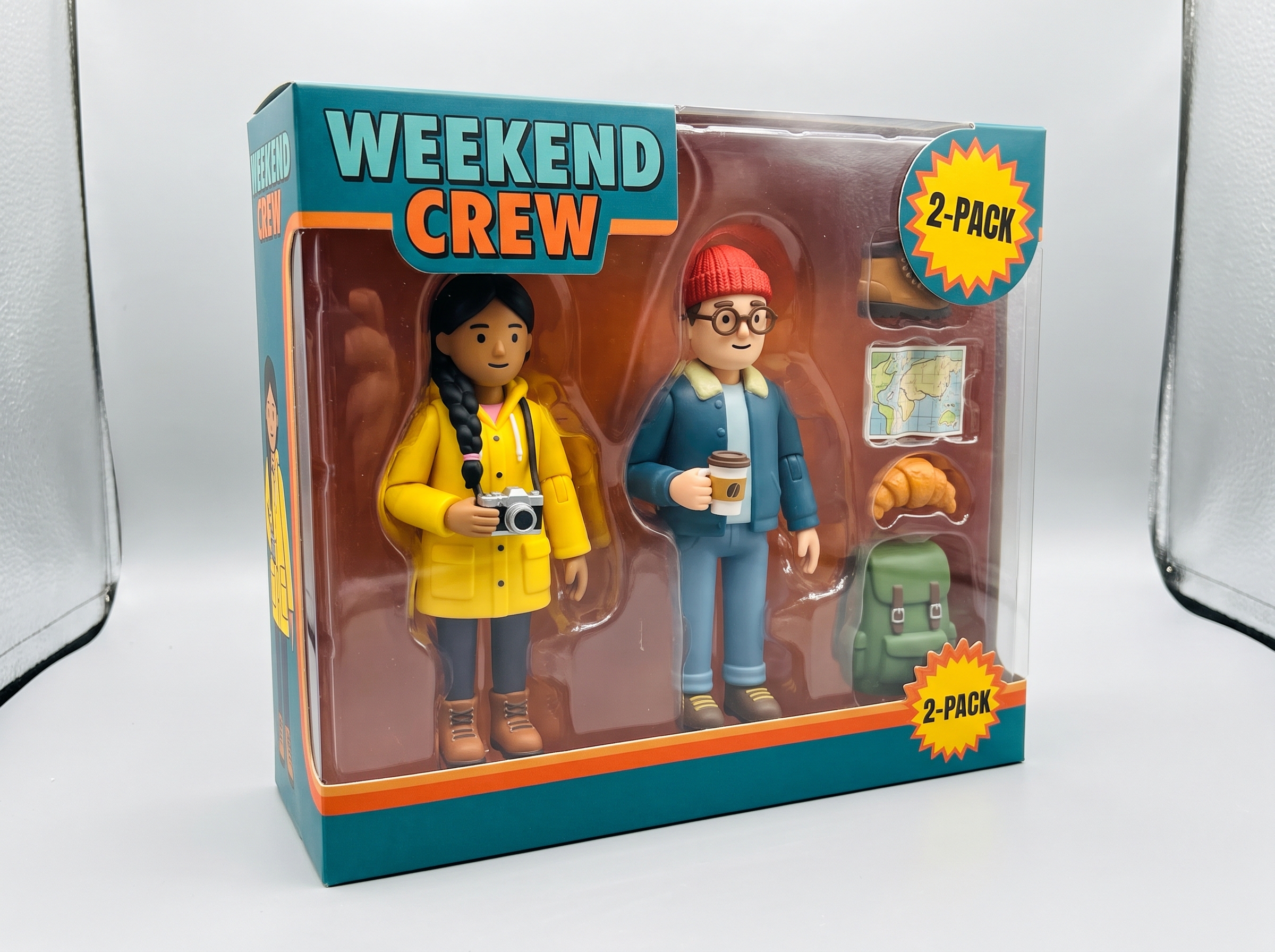
Illustrative example, not made with Gemini avatars: generated for this issue with beehiiv's Gemini-based image tool from a text description of made-up people, with no real faces or avatars. Your Gemini result will show you and your friends. Ours uses the title WEEKEND CREW and four hobby accessories.
Needs: your avatar plus 1 avatar shared with you
Create a product photo of a collectible two-pack action figure box on a light grey studio background. Inside the clear plastic window are action figures of @[you] and @[friend], each in their everyday outfit, with small accessories in molded slots that match our hobbies: [ACCESSORY 1], [ACCESSORY 2], [ACCESSORY 3], [ACCESSORY 4]. Bold retro toy-packaging graphics with the title "[CREW NAME]" and a starburst sticker that reads "2-PACK". Spell every word exactly as written. Glossy plastic reflections, soft studio light, sharp focus.
Why it works: The bracketed slots make it a fill-in template: four accessories and one title are all you change. "Product photo" and "studio background" keep it looking like a real toy on a shelf.
Try it: Gemini app · Google help: create and share an avatar
What to check in your result
Count the accessories and make sure all four are there and recognizable. Check that the figures still look like you two, not generic dolls, and that the box text is spelled right.
One variation to try
Make it a three-pack for a trip crew, or swap the box for a trading card with stats for each of you.
Before you share
- Only share your avatar with people you trust, and only tag people who said yes.
- Remember that removing someone's access doesn't delete images they already made with your likeness.
- Ask everyone in the picture before you post it publicly.
- Label AI-made images where the platform asks you to.
Go deeper
Want more prompt packs like this one? Browse past issues at luxeprompting.com. Still no news on OpenAI's next image model: "GPT Image 2.6" showed up briefly in OpenAI's public API spec on GitHub and was then taken out, so treat it as unannounced until OpenAI says otherwise.
Source Desk
All three prompts are original Luxe editorial work written for this November 2026 issue. Feature details come from Google Gemini's posts on X (October 29 and 30, 2026) and Google's help page for avatars in Gemini Apps. Example images are illustrative and were made with beehiiv's Gemini-based image tool from descriptions of made-up people, not with Gemini avatars.
Google Gemini on X (Oct 29) · Gemini Drops on X, item 11 (Oct 30) · Google help: create and share an avatar
A clearer brief. A more useful result.