In partnership with

 LUXE PROMPTING
LUXE FEATURE FIRST LOOK
Luma Character Sheet: 3 Prompts for Characters That Don't Drift
On November 4, Luma introduced Character Sheet: a tool that turns your reference images (or a written design) into one consistent multi-view sheet you can keep working from, so the next angle does not turn into a different person.
Here are three copy-paste prompts built around that job: a three-view human sheet, a mascot turnaround, and a three-outfit lookbook.
Can’t Buy the Next AI IPO Yet? Watch 3 Stocks.

Wall Street is preparing for what could become one of the biggest AI IPOs in history. But ordinary investors may have to wait until shares begin publicly trading to participate directly.
Meanwhile, three publicly traded companies could offer exposure to the AI infrastructure and investment boom surrounding Anthropic. Two are familiar names. The third is a lesser-known company that many investors haven't connected to the story.
A new, free briefing reveals all three tickers, potential entry prices, and a bonus fourth company holding thousands of patents tied to the AI race.
See the three stocks before the next wave of attention arrives. Free briefing, no credit card required.
The Short Version
- Luma Character Sheet is live in Luma and gathers references into one multi-view sheet (presets include Essential, Turnaround, Vertical, Expanded, Signature, Dossier and Lookbook).
- The pitch: once the character is right, the next view should not become someone else.
- Three prompts to copy: a FRONT / THREE-QUARTER / SIDE sheet, a four-view mascot turnaround, and a CASUAL / OFFICE / EVENING lookbook.
What changed on November 4
Luma's post said Character Sheet turns your references into one consistent sheet you can keep working from. The product page lists sheet presets such as Essential, Turnaround, Vertical, Expanded, Signature, Dossier and Lookbook, and lets you start from reference images or a written design.
Luma has not published a separate price or hard limit list for Character Sheet in that announcement, so treat availability and any plan gates as something to check in your own Luma account before you rely on it for a client deadline.
Our example images were not made with Luma Character Sheet. We generated them with beehiiv's Gemini-based image tool to show the layout each prompt asks for.
1. A three-view sheet that locks the face
Start with the classic front / three-quarter / side set. Fill in the brackets for your character, then use the finished sheet as the source of truth for later shots.
The exact prompt
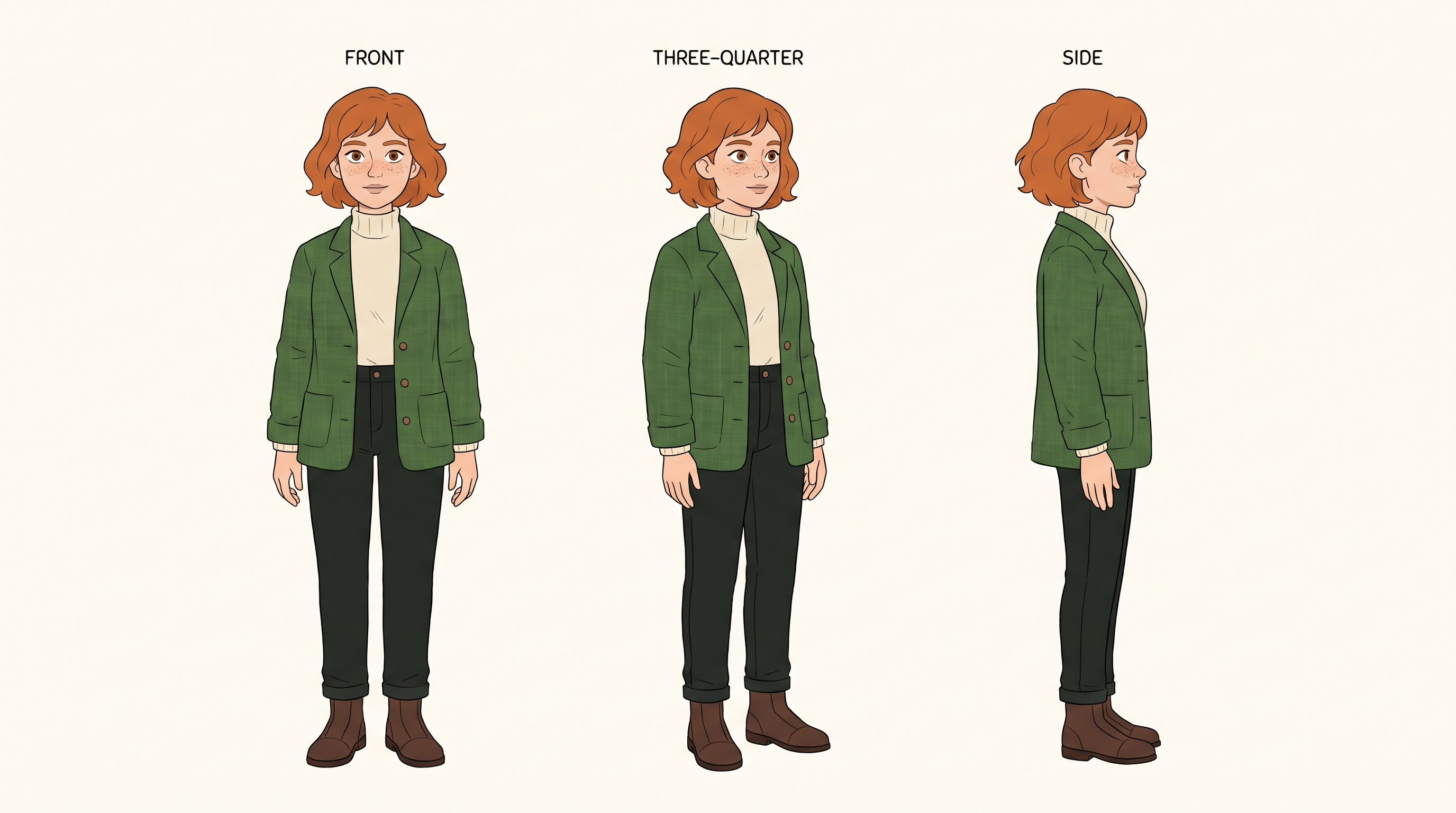
Illustrative example made for this issue with beehiiv's Gemini-based image tool from a close version of the prompt. It shows the look a finished sheet aims for; it was not made with Luma Character Sheet. Ours fills in a made-up character named Mira.
Needs: nothing, or 2–4 clean reference photos
Create a character reference sheet on a clean off-white background for [CHARACTER NAME]: [AGE RANGE], [HAIR], [DISTINCTIVE FEATURE], wearing [OUTFIT]. Show three evenly spaced views labeled FRONT, THREE-QUARTER and SIDE in small black capitals. Keep the face, hair, outfit and proportions identical across all three. Flat even studio lighting, no dramatic shadows, generous margins. Spell every label exactly as written.
Why it works: Labeled views force the model to repeat the same face and outfit instead of inventing a new person for each angle.
Try it: Luma Character Sheet · Luma on X (Nov 4)
What to check in your result
Compare freckles, hairline, jacket seams and eye color across the three views. If one view drifts, regenerate only that view or pin the best sheet and work from it.
One variation to try
Make a holiday version: same character in a winter coat, with FRONT / THREE-QUARTER / SIDE still labeled.
200+ Proven Ways to Make Money With AI in 2026

The next wave of millionaires will be people who figured out how to make AI work for them.
The window to get ahead is still open. But not for long.
Here are 200+ proven ways to make money with AI in 2026.
Sign up for Superhuman AI, the free daily newsletter read by 1M+ professionals, and get instant access to all 200+ ways to profit from AI this year.
2. A mascot turnaround for brand work
Mascots drift even faster than people. A four-view turnaround is the cheapest way to catch a hat or scarf that vanishes on the back view.
The exact prompt
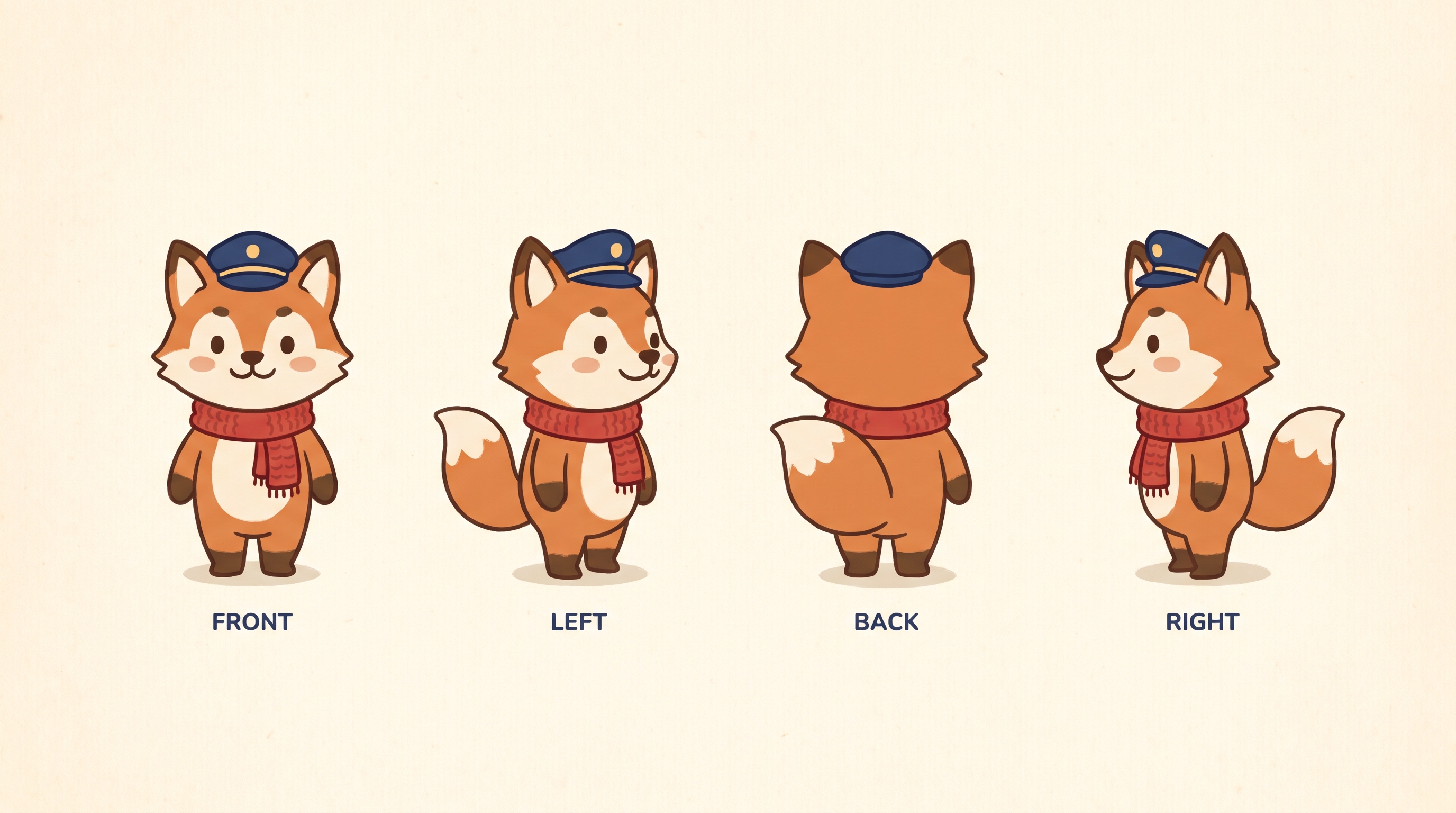
Illustrative example made for this issue with beehiiv's Gemini-based image tool from a close version of the prompt. It shows the look a finished sheet aims for; it was not made with Luma Character Sheet. Ours uses a made-up fox captain.
Needs: nothing, or a few mascot sketches
Create a four-view turnaround sheet on pale cream paper for a brand mascot: [MASCOT DESCRIPTION], wearing [ACCESSORY]. Show FRONT, LEFT, BACK and RIGHT in a single row, each labeled in small navy capitals. Same face markings, colors and accessories in every view. Flat illustrated style with soft paper grain. Spell every label exactly as written.
Why it works: Naming FRONT, LEFT, BACK and RIGHT plus "same markings in every view" is what catches accessories that disappear when the character turns around.
Try it: Luma Character Sheet · Luma on X (Nov 4)
What to check in your result
Check the hat, scarf and face markings on the back view first. That is where consistency usually breaks.
One variation to try
Swap the fox for your own mascot, or make a sticker-sheet version with the same four views on a transparent layout.
3. One face, three outfits
A lookbook sheet tests whether the face survives wardrobe changes. That is the hard part of casting a character across a campaign.
The exact prompt
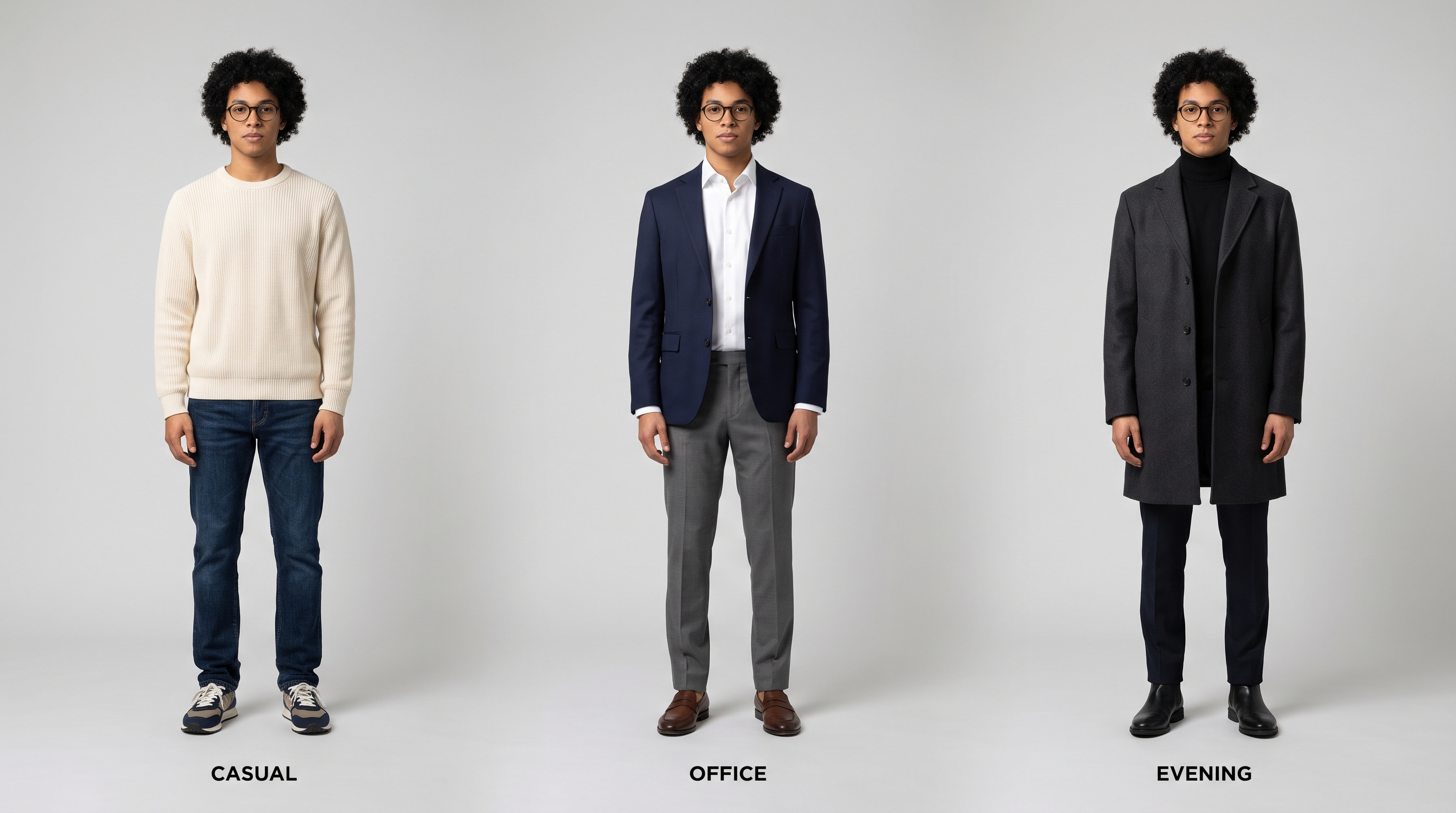
Illustrative example made for this issue with beehiiv's Gemini-based image tool from a close version of the prompt. It shows the look a finished sheet aims for; it was not made with Luma Character Sheet. Ours shows a made-up person in three outfits.
Needs: nothing, or a face reference plus outfit refs
Create a fashion lookbook sheet on a soft gray studio background for [CHARACTER NAME]: same face and hair in three outfits side by side, labeled CASUAL, OFFICE and EVENING in small black capitals. Left outfit: [CASUAL]. Middle: [OFFICE]. Right: [EVENING]. Keep the face, hair and body proportions identical across all three. Clean editorial lighting. Spell every label exactly as written.
Why it works: It freezes identity first (same face and hair), then allows only the clothes to change, which is the opposite of how most models prefer to reinvent everything.
Try it: Luma Character Sheet · Luma on X (Nov 4)
What to check in your result
Zoom in on the eyes, glasses and hairline across all three. The outfits should change; the person should not.
One variation to try
Build a seasonal set: the same character in autumn, holiday and New Year outfits on one sheet.
Go deeper
Open Luma's https://app.lumalabs.ai/solutions/character-sheet-plugin and try one of the presets with your own refs. For more prompt packs like this one, browse past issues at luxeprompting.com.
Free tool · from AgentStudios
Free 3D props and textures for your character scenes
Give your character sheet a world: procedural textures, Blender tools and shader looks, MIT-licensed.
A free account downloads every piece marked free.
Source Desk
All three prompts are original Luxe editorial work written for this November 2026 issue. Feature details come from Luma's Character Sheet post on X (November 4, 2026) and Luma's Character Sheet product page. Example images are illustrative and were made with beehiiv's Gemini-based image tool, not Luma Character Sheet.
A clearer brief. A more useful result.