In partnership with

 LUXE PROMPTING
LUXE MODEL FIRST LOOK
MAI-Image-2.7 Is Here: 3 Edit Prompts to Try on Your Own Photos
Microsoft released MAI-Image-2.7 on October 27, a preview of its newest image editing model. You upload a photo, describe the change, and it edits that photo instead of drawing a new one.
It debuted at #3 on Arena's image-edit leaderboard and #2 on Artificial Analysis's editing leaderboard, ahead of OpenAI's GPT Image 2.5 Flare. Microsoft says its biggest gains are relighting a scene, changing text inside an image, and restoring old photos. Here are three prompts that test exactly those.
More patients say ”Yes” with Cherry Payment Plans

Had enough of, “Let me think about it?” With Cherry, patients can apply for financing solutions on their phones in about 35 seconds - and 90% of them are approved*.
The result? Practices have seen acceptance rates rising by as much as 50%!
* These figures come from Cherry’s provider case studies, so individual results vary. Details at withcherry.com/provider-reviews. Payment options through Cherry are issued by the following financing partners: withcherry.com/financing-partners
The Short Version
- MAI-Image-2.7 is free to try in Microsoft's MAI Playground with a Microsoft account (availability can vary by country). It's an editing model for now: Microsoft says text-to-image is coming soon. There's no API or price yet.
- Edit prompts work best when you say what to change and, just as clearly, what to keep.
- Three prompts to copy: relight a street photo to blue hour, rewrite a chalkboard sign for fall, and restore a damaged family photo.
What changed from 2.6
MAI-Image-2.6 came out in August. Microsoft says 2.7 improves on it across all 10 use cases and all 7 editing actions that Artificial Analysis tests, and is now at the top of four of them: scene and style, text and symbol editing, reasoning-based edits, and enhancement and restoration. Its clearest lead is scene and style, 24 Elo points ahead of the next model.
It isn't best at everything. On Artificial Analysis, OpenAI's GPT Image 2.5 Sunburst still ranks first overall and leads on moving single objects, keeping a person's identity, and composition edits. So if your edit is "same face, new outfit," compare both before you switch.
A note on the rankings: Arena and Artificial Analysis scores come from blind votes by users. They're a good signal, not a promise for your photos.
Our examples were not made with MAI-Image-2.7. We made both halves of each pair with beehiiv's built-in, Gemini-based image tool, so you can see what each edit prompt asks for. Try the same prompt on your own photo in the Playground.
1. Relight a daytime photo to blue hour
Relighting is the hardest edit to fake: the sky, every window and every reflection have to agree. That's the scene-and-style category where Microsoft says 2.7 leads by the widest margin.
The exact prompt
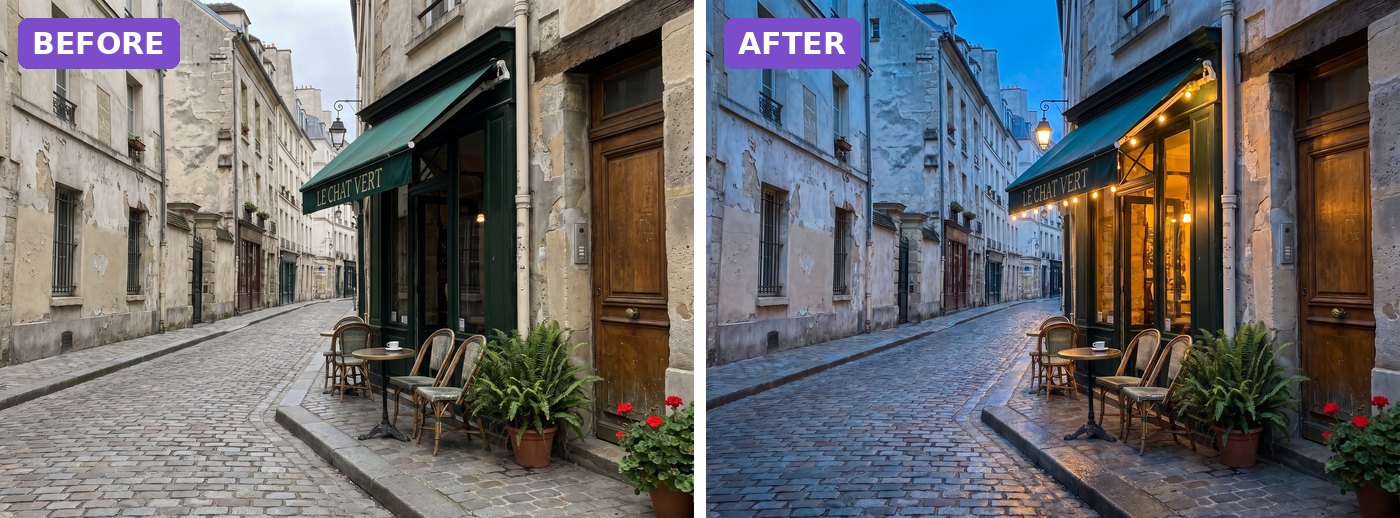
Illustrative before-and-after, not made with MAI-Image-2.7: both halves were generated for this issue with beehiiv's Gemini-based image tool, the right half from a close version of this edit prompt, adapted to our test photo. Your MAI-Image-2.7 result will differ.
Upload: 1 daytime photo of a street, shopfront or building of your own
Relight this photo as blue hour just after sunset: a deep blue evening sky, warm tungsten light glowing from the windows and any lamps, a string of small warm bulbs along the edge of the awning, and wet ground reflecting the lights after light rain. Keep the street, the buildings, the signs and their lettering, the furniture and the plants exactly where they are. Change only the light, the sky and the wetness of the ground.
Why it works: It names the new light sources (windows, lamps, bulbs) instead of just saying "make it night," and it lists what must stay put. The wet ground gives the light something to reflect, which sells the change.
Try it: MAI Playground (free, Microsoft account) · Arena (image edit leaderboard)
What to check in your result
Compare the two images side by side. Signs, chairs and plants should not have moved or changed shape, and any lettering should still be spelled the same.
One variation to try
Swap blue hour for "golden hour with long shadows" or "first snowfall at dusk." Keep the last two sentences word for word.
2. Rewrite the words on a sign
Changing text inside a photo, so it looks written on rather than pasted on, is another category Microsoft says 2.7 now leads. A chalkboard is a good test because handwriting has to match.
The exact prompt
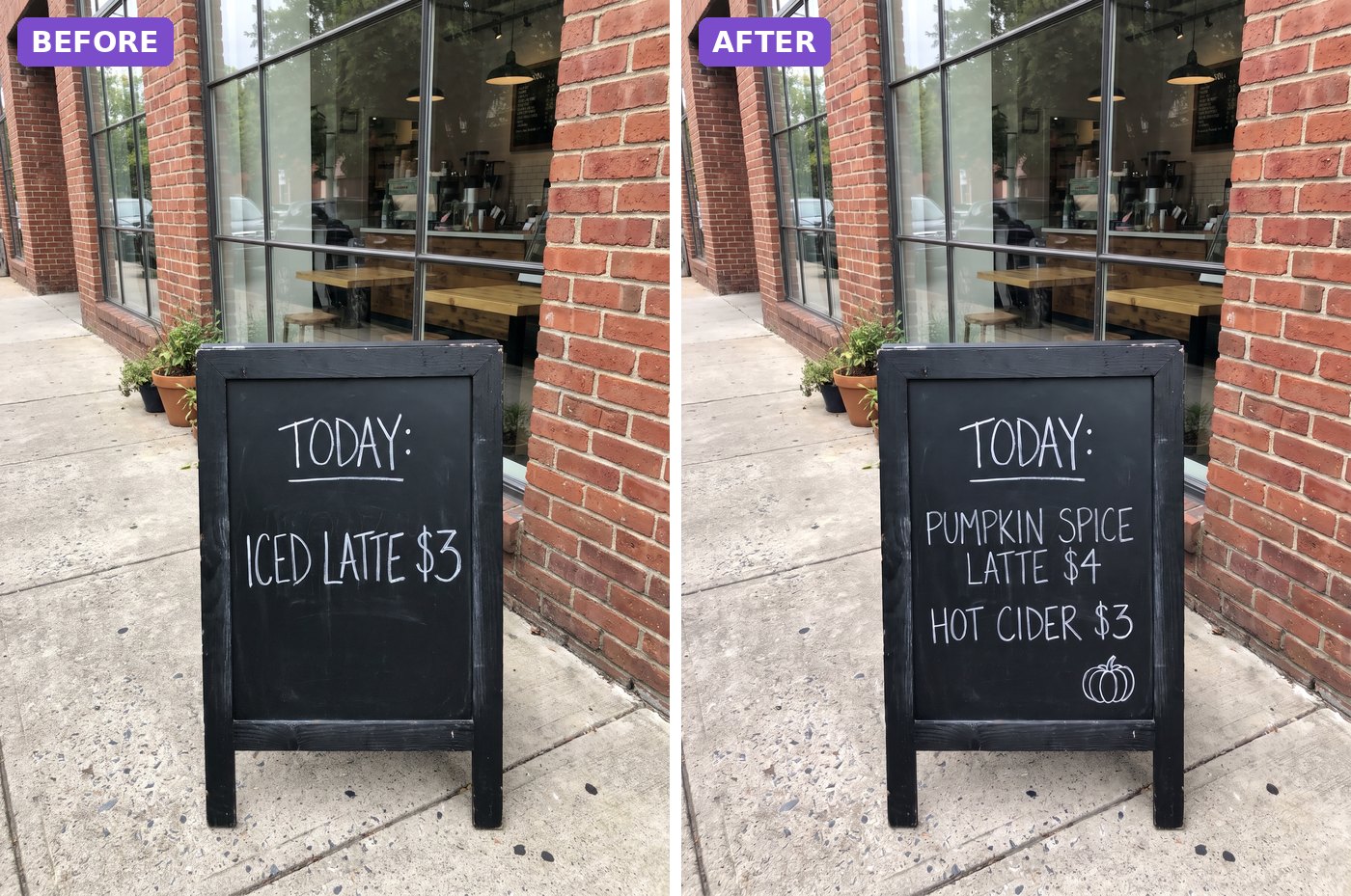
Illustrative before-and-after, not made with MAI-Image-2.7: both halves were generated for this issue with beehiiv's Gemini-based image tool, the right half from a close version of this edit prompt, adapted to our test photo. Your MAI-Image-2.7 result will differ.
Upload: 1 photo of a sign, menu board or label with text on it
Change only the chalk writing on the sign. Line 1 stays "TODAY:". Replace line 2 with "PUMPKIN SPICE LATTE $4" and add line 3: "HOT CIDER $3". Use the same white chalk handwriting, the same letter size and slant, as if the same person wrote it. Add one small chalk pumpkin doodle in the bottom-right corner of the board. Keep the sign frame, the sidewalk, the wall, the window, the plants and the light exactly the same.
Why it works: Every new word is in quotes with a line number, and the prompt says which line stays. Asking for the same handwriting, size and slant stops the model from switching to a clean font.
Try it: MAI Playground (free, Microsoft account) · Arena (image edit leaderboard)
What to check in your result
Read each word letter by letter, including the prices. Then check the edges of the board: nothing outside the writing should have changed.
One variation to try
Use it for a menu price update, a shop window sale sign or a product label. Change only the quoted lines.
3. Restore a damaged family photo
Enhancement and restoration is the fourth category where 2.7 now ranks first. Scan or photograph an old print flat, in good light, and give it this prompt.
The exact prompt
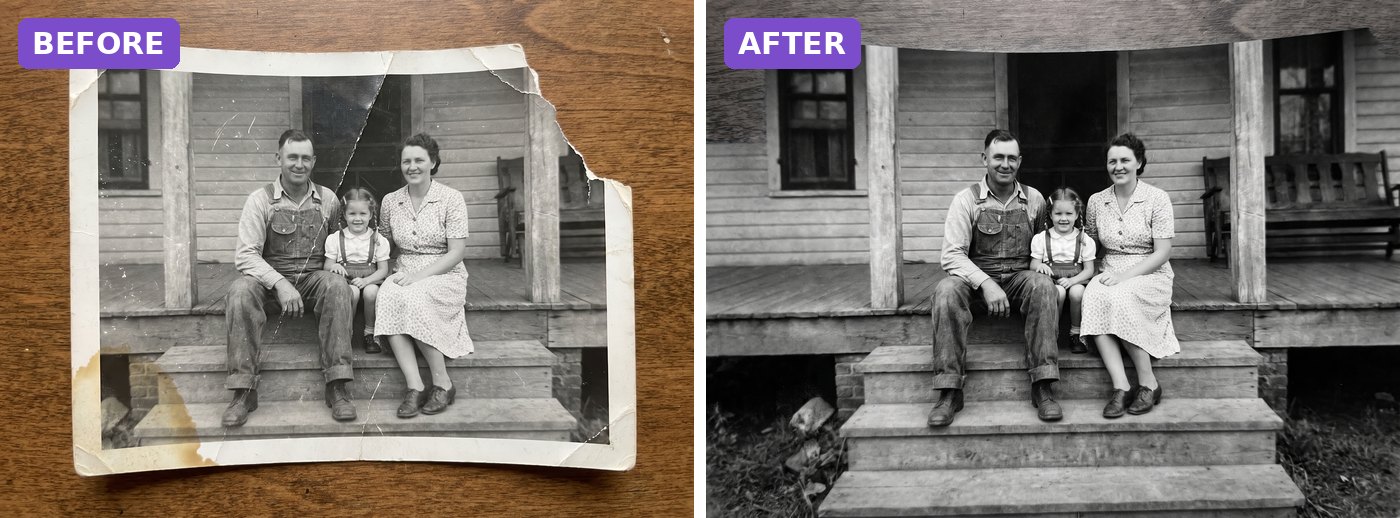
Illustrative before-and-after, not made with MAI-Image-2.7: both halves were generated for this issue with beehiiv's Gemini-based image tool, the right half from a close version of this edit prompt, adapted to our test photo. Your MAI-Image-2.7 result will differ.
Upload: 1 scan or flat photo of an old print
Restore this damaged old photo and show only the restored photograph, cropped to the picture area: no border, no table, no torn edge. Fill in any missing corner so the background continues naturally. Remove every crease, scratch, dust spot and stain. Recover rich black-and-white contrast and sharp detail. Keep every person exactly as they are: same faces, expressions, poses, clothing and positions. Black-and-white only, no added color, no skin smoothing, fine natural film grain.
Why it works: It lists each kind of damage to remove, then protects what matters most: faces, expressions and clothing. "Do not smooth the skin" and "keep film grain" stop the plastic look many restorations get.
Try it: MAI Playground (free, Microsoft account) · Arena (image edit leaderboard)
What to check in your result
Put the faces side by side with the original. Our example also widened the frame a little, so check the edges too. If anyone looks like a different person, run it again and add "change nothing inside the faces."
One variation to try
Once you have a clean version, run a second edit: "Colorize this photo with natural, faded 1950s film colors. Keep everything else the same."
Before you share
- Keep your original. Editing models can change small details you didn't ask about.
- Only edit photos you own or have permission to use, and ask family before posting restored photos of them.
- Label AI-edited images where the platform asks you to.
- It's a preview: features and limits may change before the full release.
Go deeper
Want more prompt packs like this one? Browse past issues at luxeprompting.com. And OpenAI still hasn't announced the "aurora" image models spotted in testing; until it does, treat them as a rumor.
Source Desk
All three prompts are original Luxe editorial work written for this October 2026 issue. Model details come from Microsoft AI's announcement and its posts on X (October 27, 2026). Rankings are as published by Artificial Analysis and Arena on October 27, 2026. Example images are illustrative and were made with beehiiv's Gemini-based image tool, not MAI-Image-2.7.
Microsoft AI: MAI Image 2.7 debuts (Oct 27) · Microsoft AI on X (Oct 27) · Artificial Analysis on X (Oct 27) · Arena on X (Oct 27) · MAI Playground (free, Microsoft account)
A clearer brief. A more useful result.