In partnership with

1,000+ Proven ChatGPT Prompts That Help You Work 10X Faster

ChatGPT is insanely powerful.
But most people waste 90% of its potential by using it like Google.
These 1,000+ proven ChatGPT prompts fix that and help you work 10X faster.
Sign up for Superhuman AI and get:
1,000+ ready-to-use prompts to solve problems in minutes instead of hours—tested & used by 1M+ professionals
Superhuman AI newsletter (3 min daily) so you keep learning new AI tools & tutorials to stay ahead in your career—the prompts are just the beginning
Reading this in Promotions? Move it to Primary so you get every issue.
|
Luxe Prompting Your AI Images Look Like AI. Here’s the Fix. 10 telltale signs and the exact prompt phrases that eliminate each one. |
You can spot an AI image in half a second. Something about it just feels off. Too clean. Too smooth. Too perfect. That uncanny “AI look” that makes people scroll past instead of stopping.
The problem isn’t the model. It’s what you’re not telling it. Every AI image generator defaults to “perfect” because that’s what its training data rewarded. Real photography is full of imperfections. Those imperfections are what make images feel real.
Below are 10 signs your image was made by AI, and the exact prompt phrases that fix each one. Add them to any prompt you already use.
|
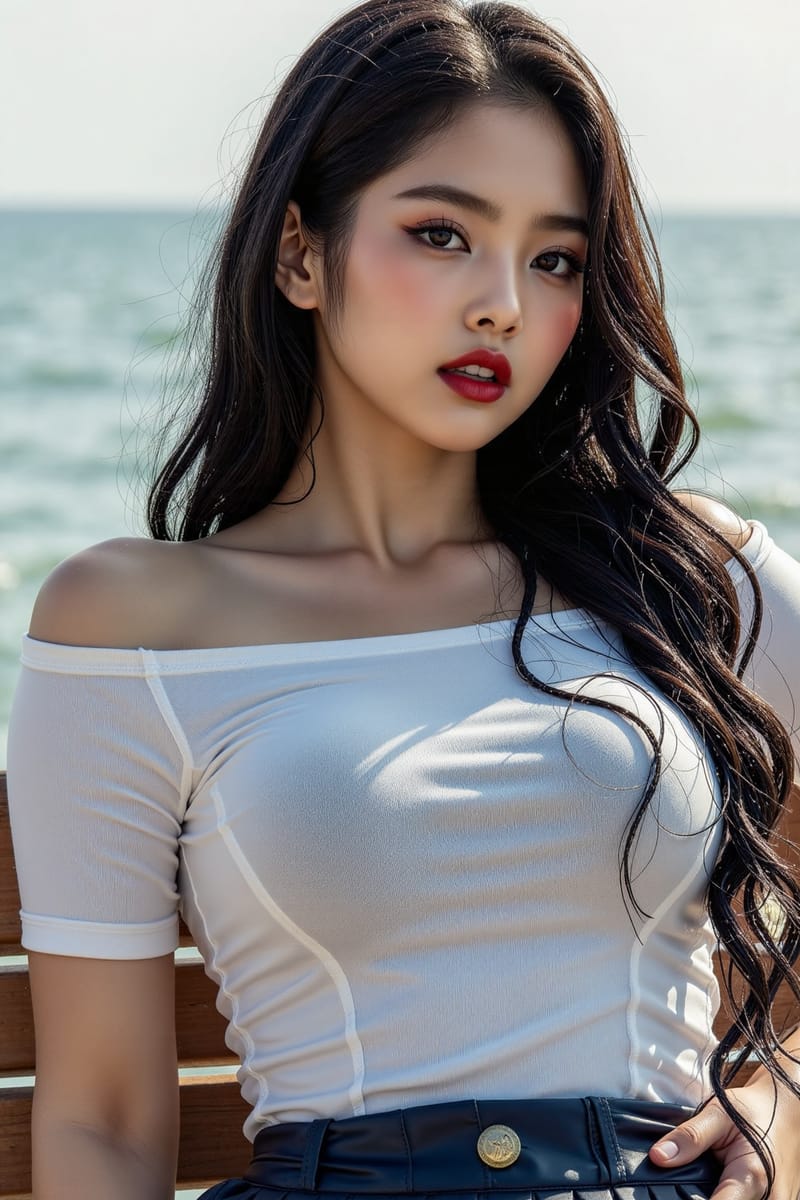
Sign 1 Skin Looks Like Plastic The tell: Perfectly smooth, poreless, airbrushed skin. Every face looks like a beauty ad with the retouching slider maxed out. No texture, no variation, no life.
|
|
Sign 2 The HDR Glow The tell: Everything is evenly lit with a warm glow. No harsh shadows, no blown highlights, no underexposed areas. Real photos have contrast. AI defaults to “pleasant.”
|
|
Sign 3 Oversaturated Colors The tell: Colors are cranked to 11. Every sunset is nuclear orange. Every sky is electric blue. Every leaf is neon green. Real photos have muted, mixed tones.
|
|
Sign 4 The Perfect Centered Subject The tell: Subject dead center. Symmetrical framing. Generic blurred background. It looks like a stock photo template. Real photographers use the rule of thirds, leading lines, and asymmetry.
|
|
Sign 5 Everything Is Too Clean The tell: No dust on surfaces. No scuff marks on shoes. No crumbs on the table. No fingerprints on glass. Real environments have wear. AI environments look like they were built 5 minutes ago.
|
|
Sign 6 Generic “Beautiful” Faces The tell: Every person looks like a slightly different version of the same person. Symmetrical features, flawless skin, no distinctive characteristics. Real faces have asymmetry, character lines, unique features.
|
|
Sign 7 No Film Grain or Noise The tell: Perfectly clean digital output. No grain, no noise, no chromatic aberration. Real cameras produce imperfections. Even digital photos at ISO 100 have subtle noise. AI images are supernaturally clean.
|
|
Sign 8 The Stiff Mannequin Pose The tell: People standing straight, arms at sides, facing camera. The corporate stock photo pose. Real humans shift their weight, tilt their heads, fidget. Nobody stands like a mannequin in a display window.
|
|
Sign 9 Impossible Lighting The tell: Shadows going in multiple directions. Light on the face but dark background with no visible light source. Rim lighting from nowhere. AI doesn’t understand physics. It fakes lighting based on what “looks cool.”
|
|
Sign 10 Too Much Detail Everywhere The tell: Everything in the image is equally sharp and detailed. In real photography, lenses focus on one plane. The background goes soft. The foreground might be blurry. AI renders everything at maximum sharpness because it doesn’t understand optics.
|
|
The Cheat Code Copy This Block. Add It to Any Prompt. This single paragraph fixes most of the AI look in one shot. Paste it at the end of whatever prompt you’re already using:
|
|
Why this works: AI models are trained on captioned images. Professional photos are tagged with camera models, lens specs, and technical details. When you include “shot on Sony A7III, 85mm f/1.8” in your prompt, you’re steering the model toward images in its training data that were taken with real cameras. The model doesn’t simulate the camera — it reproduces the look of images that were described that way. That’s why naming a specific camera and lens works better than saying “realistic.” |
|
Quick Reference
|
Coming Next
|
50 Prompt Pack 10 categories. Every model. Copy-paste ready. |
The Lighting Deep Dive 15 lighting setups with copy-paste modifiers. |
Which sign surprised you the most? Hit reply and tell me. I read every response and it helps me plan what to cover next.
See you next week.
|
Know someone whose AI images scream “made by a robot”?
Luxe Prompting · AI image generation for creators |