In partnership with

LUXE PROMPTING
ON LOCATION · THE VIDEO FIELD NOTE
Can Genie 4 Keep Track of a Lighthouse?
A lighthouse slips behind a timber post. When you step back, you expect the same lighthouse. Google opened its steerable Genie 4 worlds to eligible Project Genie users on November 18 and announced developer access on November 19. Here’s a small harbor shot you can use to judge what happens while the tower is out of sight.

Most AI newsletters get skimmed, then archived. TLDR AI is the one worth opening. It's a free daily email curated by engineers from OpenAI, Adobe, and Google DeepMind. They read everything, then send the model releases, research, and tools that actually matter. It’s a 5-minute read, delivered every weekday morning.
The Short Version
- Genie 4 can change a scene during a take and generate sound as you move through it.
- Our harbor exercise takes three views along the same rail. In the middle view, a post hides the lighthouse.
- Compare the tower’s red band and roof on the return. If both survive, try the same move with a change in the weather.
The route in three frames
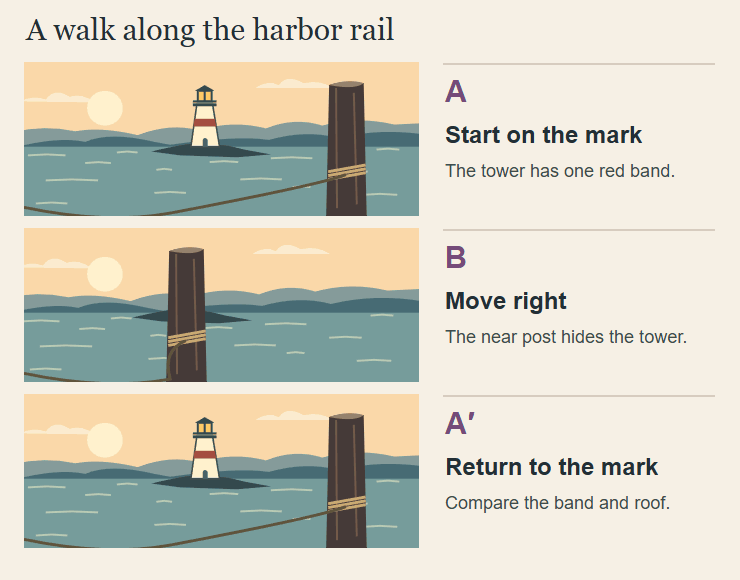
Original Luxe storyboard. The foreground post, rope and lighthouse give the camera move three distinct depths.
Follow the rope with your eye. Its turn around the post puts the post close to the camera. Beyond it, the tower stands on a low spit of land. As the camera moves sideways, the near post sweeps across the frame while the distant tower barely shifts. That difference in motion is parallax, and it gives the middle frame a job.
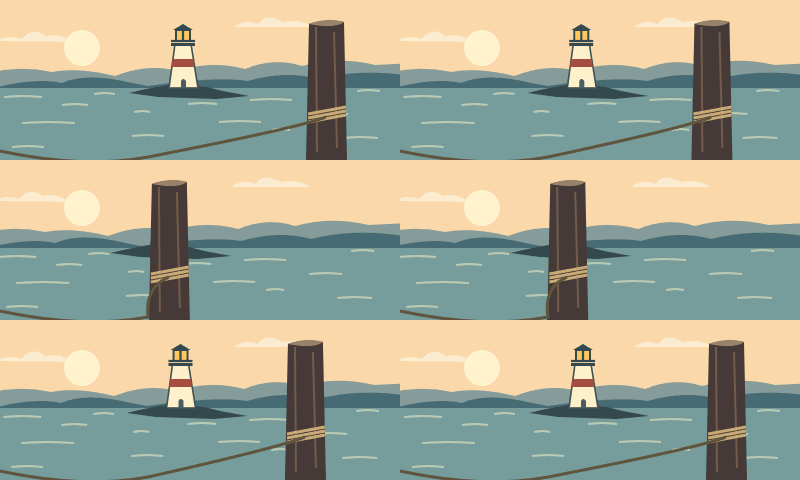
In our silent animatic, the near post travels 162 pixels sideways and the tower travels 19. At the turnaround they line up. On the way home, one red band and a dark peaked roof slide into view. We drew the scene and animated those positions directly. That gives you a known reference for the live exercise.
What Google released this week
In Project Genie, you can navigate a generated world and ask for changes while you explore it. With Genie 4, the audio responds to events in the scene. Google began the rollout for eligible Google AI Ultra subscribers on November 18. AI Pro members can join a waitlist. The browser experience is restricted to adults.
On November 19, Google added a developer route through Google AI Studio and the Gemini API. The model card describes 720p video at up to 24 frames per second with synchronized sound. It also flags a practical issue for editors. Small visual details can shift after something leaves view, particularly over longer runs or after several edits.
Take one · Walk the rail
A · Mark your start
Give your harbor one timber post nearby and one white tower with a single red band across the water. Choose a first-person view. Frame the post on the right, with a gap of daylight between it and the tower. Take a still. Pick two details you could describe to an editor over the phone. Ours are the single band and the pointed roof.
B · Hide the tower
Use the movement controls to step right while keeping your view aimed across the water. Stop when the tower is hidden. If the post leaves the frame before it covers the tower, you may have turned the camera. Reset to your start and try a side step. Keeping the distant headland level makes the motion much easier to read.
A′ · Walk back to your mark
Move left until the gap between the post and tower looks close to your starting still. Save the return frame. Compare band count and roof shape first. Exact pixel alignment matters less here because it is hard to steer back to exactly the same spot. A slightly different gap can be a camera difference. An extra red band changes the landmark itself.
Take two · Give the shower a cue
Only after the dry pass, repeat the route. At the moment the tower is covered, ask for a light shower to start over the harbor. Keep moving back toward your original mark. Listen once with your eyes closed. Where would you put a marker for the start of the rain? Watch again and mark the first visible drops.
Those two marks tell you different things. Rain heard a moment early can suggest a shower approaching from beyond the frame. Rain that continues through a cut to a dry interior may need a sound edit. If the new weather washes out the tower’s band, record it as hard to see. You need a clearer return view to decide whether the band changed.
Which take would you cut in?
Put the start and return frames side by side. Give the editor one sentence with a decision and the reason. For our drawn example, we’d use the full move because the tower returns with the same band and roof. For a take where the tower changes, we’d end the shot while the post fills the view and cut to a close-up of the wet rope. The audience would still get a reveal, this time through detail.
You can try the move today with a phone, a doorframe and a mug with a handle. Keep the phone pointed at the mug, slide until the frame conceals it, then slide back. Look for the instant the handle reappears. That’s the moment to watch in a generated shot, and it costs nothing to learn where to look.
Source Desk
Reporting checked November 19, 2026. Google documents the release and model limits. Luxe created the harbor illustration and silent animatic. The two takes are reader exercises.
Google · The November 18 Project Genie rollout
Google · The November 19 Gemini API and AI Studio release
A clearer brief. A more useful result.