LUXE PROMPTING
COMMUNITY PROMPT LAB
Three community ideas. Three clearer creative briefs.
A small comic moment, a scene that stays in one place, and a character you can recognize from every angle. Three captured community posts offer useful starting points. This workshop turns those ideas into new Luxe exercises, with three original stills and practical ways to judge what your next generation actually follows.
Paid advertisement · Superhuman AI
1,000+ Claude Prompts Top Professionals Actually Use at Work

Claude can be your analyst, editor, and strategist.
But most professionals are using it to fix grammar.
These 1,000+ Claude prompts take it from grammar tool to your most powerful AI work assistant.
Sign up for Superhuman AI and get:
1,000+ ready-to-use Claude prompts to get real work done in minutes — researched, tested, and used by professionals at Google, Microsoft, and NASA
Superhuman AI newsletter (4 min daily) so you keep learning new AI tools and skills to stay ahead in your career — the prompts are just the beginning
The Short Version
- Learn three techniques from credited community source posts.
- Try three complete, original Luxe image prompts and inspect their results.
- Use optional video briefs as experiments; the moving scenes have not been rendered.
The community starting point
Emmanuel Rey G. Santoyu’s Pirate Chef, same-location Shibuya and EZ BLUE briefs appeared at positions 1, 2 and 3 in a managed group’s Top Posts table when we inspected it on September 27. Facebook labeled that table as the posts with the most activity in the last 28 days. These are recorded positions in that one table, not a new ranking today or a count of prompt reuse.
The useful thread across the three posts is specific direction: who stays in the scene, what happens next, and what must remain recognizable. We link each original below. The illustrations and exercises here are new Luxe work; they are not the member’s images, full prompts or generated results.
1. Give a tiny story one readable turn
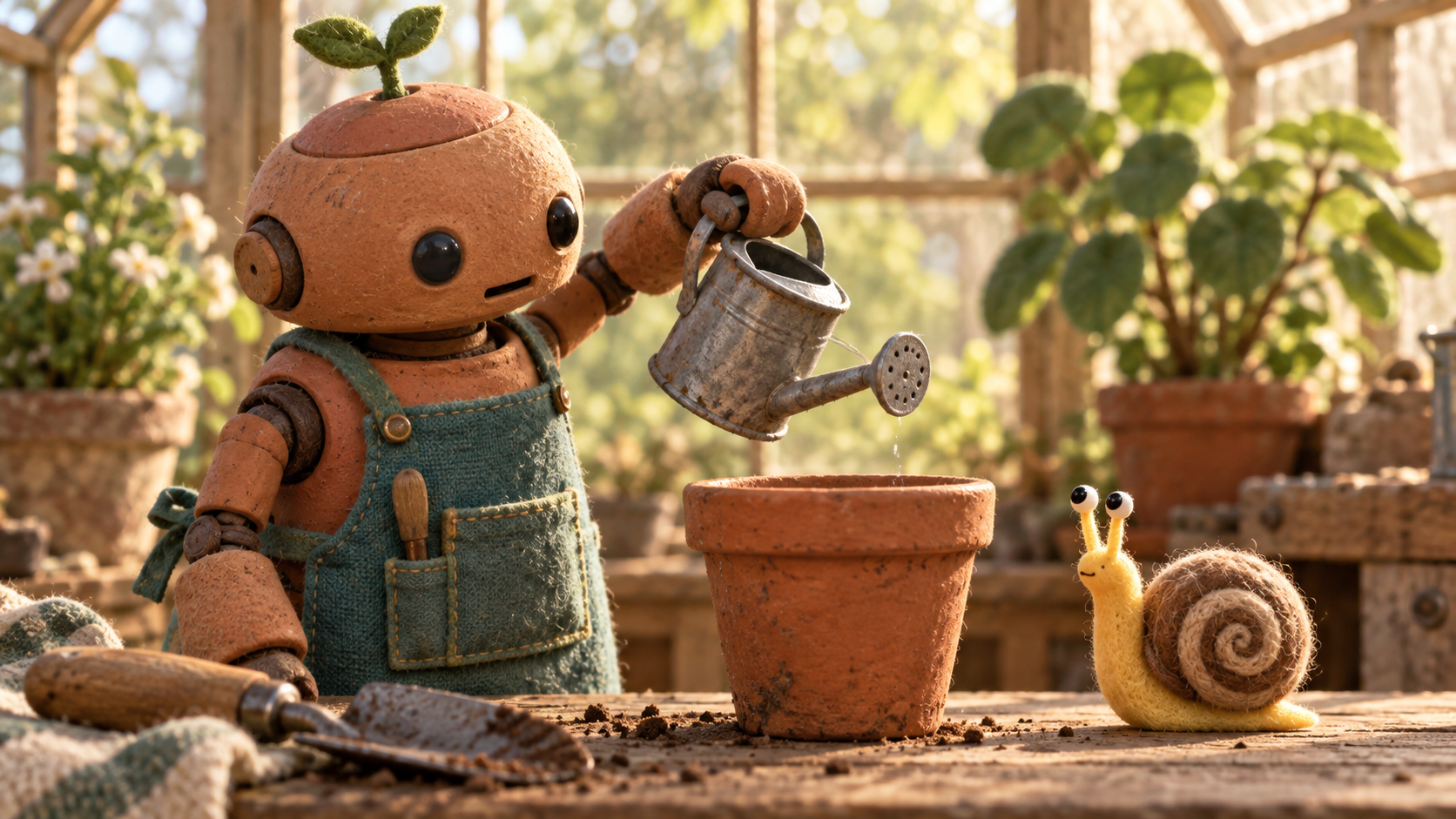
Original AI-generated Luxe keyframe from the exact prompt below. Extra background plants appear; this is one generated still, not a rendered video.
The Pirate Chef brief sets a playful cooking scene around a chef and one mischievous parrot. Its captured text separates the timeline, sound design, characters and continuity rules. A short source phrase captures the discipline: “one continuous location throughout”. The setting stays stable while the relationship supplies the movement.
Our takeaway is to make the change easy to notice. Start with an ordinary task, introduce one small interruption, then end with a response. You do not need a bigger cast or a camera move for every beat. A quiet reaction can give the viewer something clear to follow.
For a different, original scene, we chose a greenhouse gardener and a curious snail. The keyframe establishes the objects before anything happens. Its warm material contrast helps distinguish clay, cloth and shell without relying on explanatory text.
Copy the greenhouse keyframe prompt
Create a wide 16:9 editorial illustration in tactile stop-motion felt-and-wood miniature style. In a tiny sunlit greenhouse workbench scene, a fictional round terracotta robot gardener wearing a teal canvas apron holds a small watering can above one empty flowerpot. A single curious yellow snail with a spiral shell watches from beside the pot. Show the moment just before the gardener notices the snail. Keep one robot, one snail, one watering can and one empty pot clearly readable, with two blurred leafy plants in the background. Warm morning side light, detailed felt fibers and matte clay texture, gentle visual humor, no speech bubbles, no letters, no logos, no watermark.
Read the result, then change one thing
The generated still shows one gardener, one snail, one watering can and the foreground flowerpot clearly. It also adds more background plants than the requested two. Treat that as a visible deviation, not proof that every instruction worked. If the background competes with your subject, simplify that sentence before adding more detail.
Choose the turn
Keep the same two characters and change only the gardener’s response: surprise, patience or amusement. Compare whether the expression tells the story without a caption.
Keep a useful record
Save the prompt, settings and output together. Note what changed rather than describing one attractive result as a reliable formula.
Optional video exercise · not rendered
Using your generated greenhouse still as the visual starting point if your tool supports image-to-video, create an 8-second continuous shot. Keep one terracotta robot gardener, one yellow snail, one foreground pot and the same workbench. In seconds 0–3 the robot begins to tilt the watering can. In seconds 3–5 it notices the snail and pauses before water reaches the snail. In seconds 5–8 it gently sets the can down and places a small leaf beside the snail. Keep the camera almost still. Use only soft greenhouse ambience and small object sounds, with no speech, music, text or logos. Preserve the subjects’ proportions; do not add another animal or change location.
2. Keep the world still while the story moves
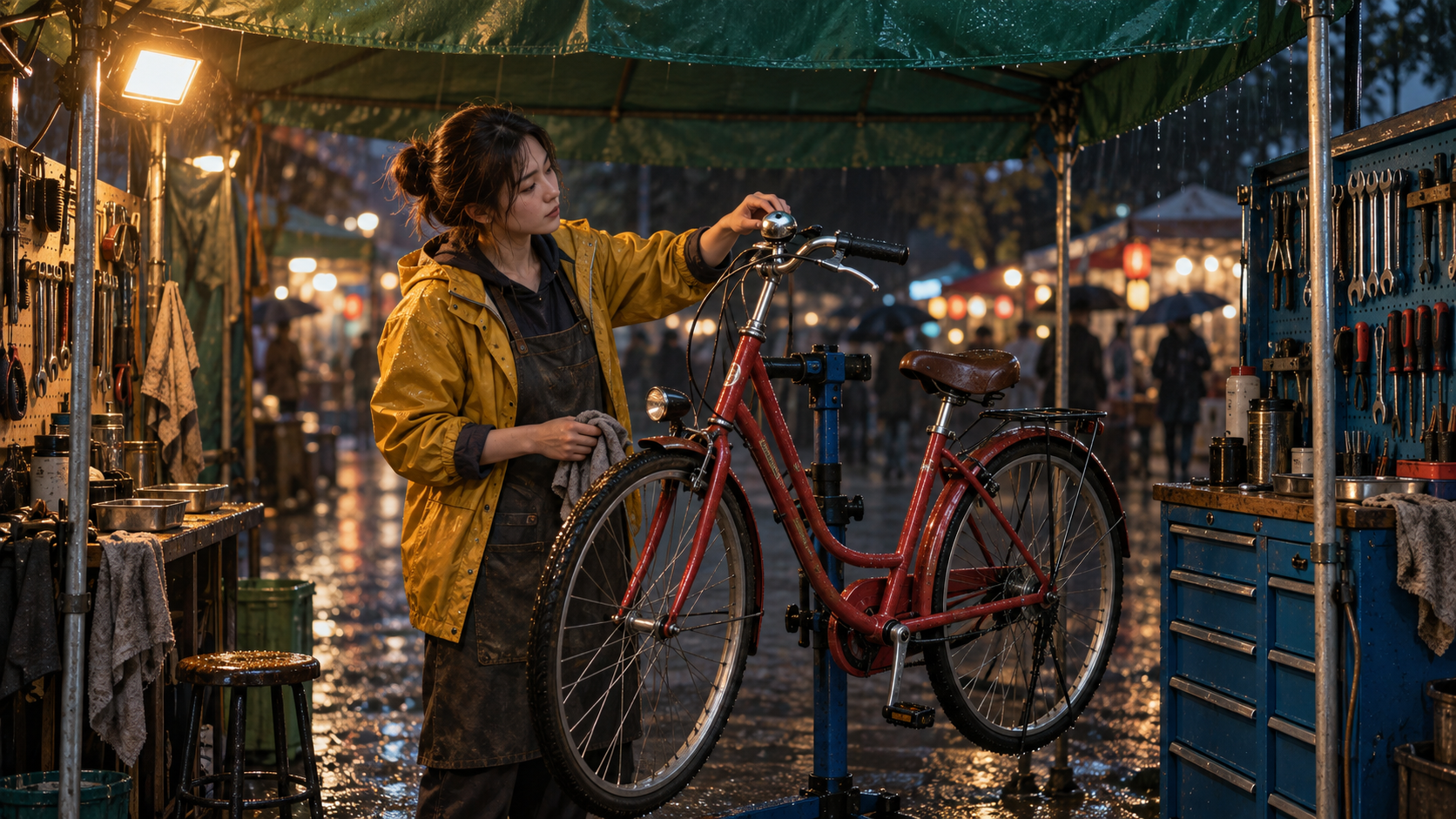
Original AI-generated Luxe still from the exact prompt below. The awning, lamp, cabinet and paving are visible; temporal continuity has not been tested.
The Shibuya brief repeatedly restricts a fictional action scene to one crossing. Its central instruction is unusually clear: “The entire fight remains physically grounded within the same Shibuya Crossing location for the entire clip.” The lesson we take from that text is spatial continuity, not the combat itself.
A location can have a few durable anchors: the same awning, work light, cabinet and patch of ground. Name those anchors before choreographing an action. Then ask whether the camera can show the change without implying a move to a different place.
Our original exercise swaps the action scene for a night-market bicycle repair stall. The mechanic has one small task: reach for the bell. That gives you an observable action while leaving the environment simple enough to compare across frames.
Copy the repair-stall keyframe prompt
Create a wide 16:9 cinematic still of a fictional night-market bicycle repair stall in light rain. An adult female mechanic in a mustard-yellow rain jacket stands beside one red city bicycle on a repair stand, reaching toward a silver bell on the handlebar. Lock the scene to this one small stall: a green canvas awning across the top, a warm rectangular work light upper left, a blue tool cabinet on the right, and wet dark paving below. Keep all four landmarks clearly visible in the same frame. Eye-level medium-wide view, a 40mm lens feeling, believable photographic materials, restrained amber and teal color, soft distant market bokeh without readable signs. No weapons, no logos, no watermark, no visible text.
Use the frame as a continuity checklist
In this still, the green awning, warm light, blue cabinet and wet paving are visible. That establishes a useful starting frame; it does not demonstrate that a video model will preserve them over time. When trying a moving version, inspect the beginning, middle and end rather than trusting the first frame alone.
- Does the red bicycle stay on the same stand?
- Do the lamp and cabinet remain on the same sides of the stall?
- Does the mechanic finish one action without an unexplained cut or extra person?
Optional motion exercise · not rendered
Animate the repair-stall image as one 6-second shot if your video tool supports a starting image. Preserve the woman’s mustard rain jacket, one red bicycle, the green awning, upper-left warm lamp, right-side blue cabinet and wet paving. The mechanic presses the silver bell once, listens, then gives a small satisfied nod. Use a very slow forward camera movement without crossing the bicycle or changing the room layout. Keep rain and one bell sound; no dialogue, music, new people, extra bicycles, text or logos.
3. Give your character a compact identity card
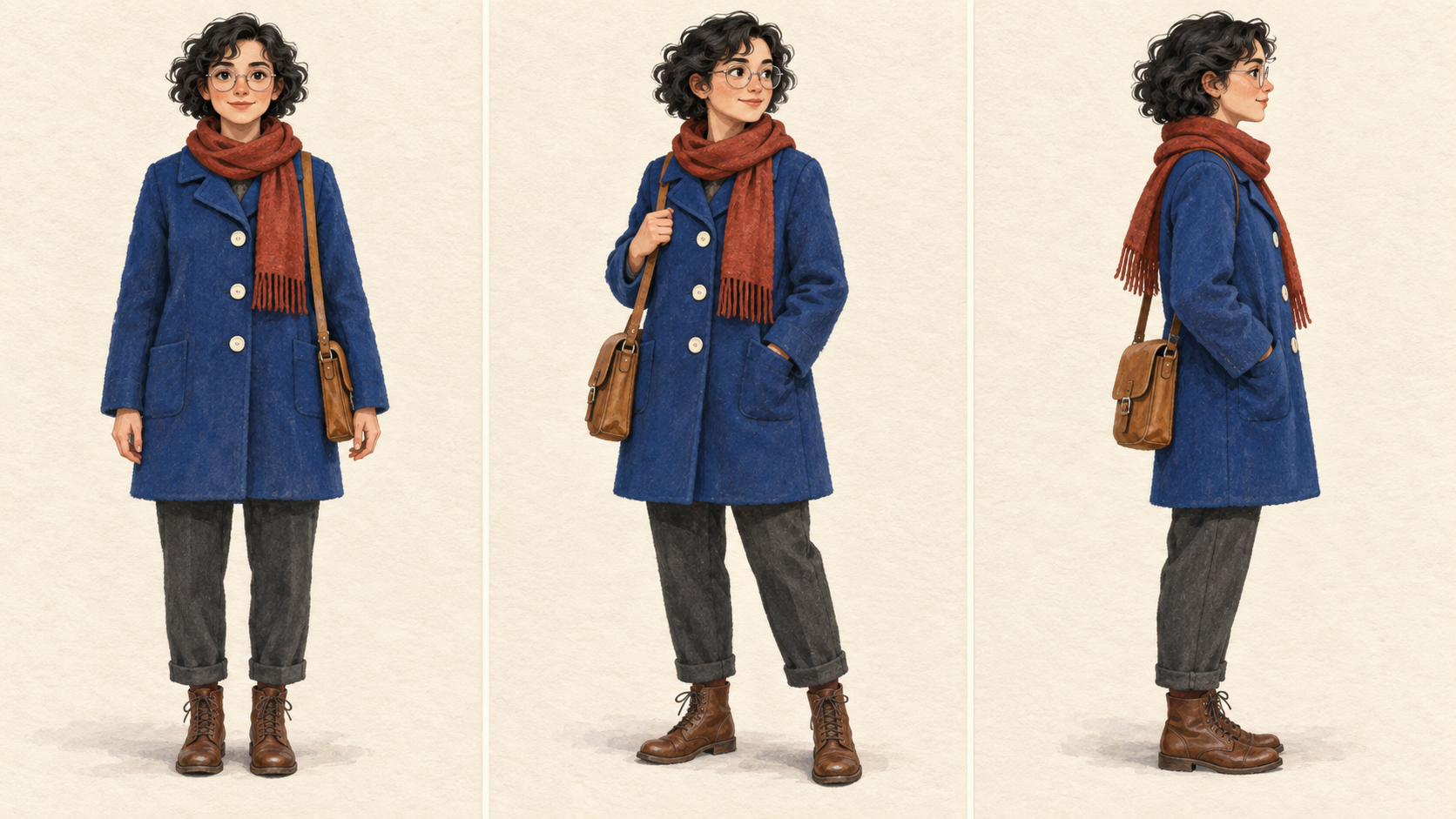
Original AI-generated Luxe reference sheet. The outfit remains similar across views, but the scarf obscures the requested three-button count; two buttons are clearly visible.
The captured EZ BLUE brief devotes substantial space to appearance, clothing and recognizability during motion. One useful line is: “The camera must keep EZ BLUE visually readable during high-speed movement.” That is a concrete check to carry into an original design: can you still identify your subject when pose or camera angle changes?
Start with a small set of visible features instead of an ever-growing list. Our fictional lighthouse courier has curly hair, round spectacles, a blue coat, a rust scarf and a tan satchel. None of those features depends on borrowing a member’s likeness or reference image.
A reference sheet makes comparison convenient. Front, three-quarter and profile views give you a chance to inspect the same outfit at different angles before spending effort on a longer scene.
Copy the courier reference-sheet prompt
Create a wide 16:9 three-panel character reference illustration, with three equally sized panels separated only by thin cream gutters and no text. Show the same original adult female lighthouse courier in every panel: short curly black hair, round silver spectacles, a cobalt-blue wool coat with exactly three large ivory buttons, rust-red scarf, charcoal trousers, brown lace-up boots and a small tan leather shoulder satchel. Left panel is a front full-body neutral standing view, center panel a three-quarter full-body view holding the satchel strap, right panel a profile full-body view. Friendly editorial gouache on lightly textured warm cream paper, clear silhouettes, consistent proportions and clothing across all three views, subtle ground shadows, no scenic background, no labels, no letters, no logo, no watermark.
The small mismatch is the useful part
The courier’s overall silhouette and clothing remain similar across the three panels. The exact button instruction is less dependable: the scarf obscures part of the coat, and only two ivory buttons are clearly visible. This is a useful reminder to inspect specific requirements instead of accepting general resemblance.
If button count matters to your project, make it easier to see: shorten or reposition the scarf in a revised prompt and inspect the next result. If it does not matter, choose a more visible feature for continuity checks. Treat the sheet as a starting design, not a guarantee of identity preservation in another model.
Pick three essentials
Choose the visible features that make your fictional character recognizable. Keep that list beside your prompt and check each output against it.
Separate pose from identity
Change the action while keeping those essentials fixed. Judge whether the action changed successfully and whether identity stayed readable as two separate questions.
A short experiment for your next session
Choose one workshop and make a single, named revision. Keep the tool and its available settings fixed, save both outputs, and record one observation in plain language. For example: the cabinet stayed in place, the scarf hid a button, or the extra plants distracted from the snail.
The aim is a brief you can evaluate. A source post can give you an idea; your own saved results tell you which parts of that idea your current tool actually follows. Credit the creator when sharing the source, and distinguish your experiment from their original work.
From Luxe · Unpaid house promotion
Keep building a small library of prompts you understand. The Luxe archive brings together creative exercises you can adapt to your own projects. This is our own publication, not a paid sponsorship.
Source Desk
Community source text was captured September 27, 2026. The preserved Top Posts table used a 28-day activity window; no current engagement count or fresh ranking is claimed. All three displayed images are original Luxe AI-generated stills made from the exact prompts shown. Companion video briefs are unrendered exercises. Original source images and full member prompts are not republished.
Emmanuel Rey G. Santoyu: Pirate Chef ASMR Comedy
A clearer brief. A more useful result.